Friday, September 21, 2007

Software Development Metaphors

There are lots of discussions on Software Development "methodologies". They are codified sets of practices on how to do software development "correctly". When you get down to the root of each of these methodologies, the root of all of them is a metaphor. Before you adopt a methodology such as XP, Scrum, RUP, Software Factory, etc. you should really ask yourself what metaphor you believe your particular software development practices fit into and what metaphors fit your particular organization's culture. If you start there instead of at the "here is my fancy new toolbox of processes" then adoption will be higher.

So here is a list of popular metaphors used to explain the practice of creating software...

The Traditional Software Development Metaphors

Software Development as Factory
  • Heavy emphasis on frameworks (assembly line) and components (widgets)
  • Use in large scale development projects (hundreds of developers) or highly distributed projects (outsourced)
  • Highly centralized control of processes, tools, etc.

Software Development as Engineering

  • Heavy focus on estimation techniques
  • Fixes made in planning are less expensive than after “construction” has started.
  • Highest project management priority is being “in control”.
  • Software development as a science, e.g. objective, measurable.
  • Belief that Software Development is an immature or imprecise version of engineering.

Software Development as Model/Architecture

  • Architect as “GOD”
  • Code is simply implementation of a model
  • If the software doesn’t work, either the model is wrong or the code doesn’t implement the model properly.
  • Tooling can automatically generate application from the model.
  • Software models a business, a process, etc. in design. Goal of software is to accurately reflect real life processes.
  • Need specialized modeling languages, expertise, and tools

Software Development as Workflow/Process

  • Projects as repeatable processes.
  • Workflow is defined up front, and people are compartmentalized.
  • Emphasis on distribution, encapsulation and hand-off.
  • Project managers are process champions – they make sure the rules are followed.

These metaphors have formed the bedrock of software development. They represent the traditional way of viewing software development as well as project management in general. They have enabled a whole toolbox of techniques, tools and templates for managing projects and software development.

The Radical Software Development Metaphors

These metaphors have become in vogue thanks to various agile methodologies, reactions against the traditional view of software and frankly a lot of failures for the traditional metaphors to come to grips with the complexities of creating software.

Software Development as Craft/Voodoo/Martial Art

  • Focus on simplicity, elegance, and craftsmanship
  • Toolbox approach
  • Apprentice / Master / Guru model
  • Software is highly dependent on people
  • Software “Design” provides guide to picking solutions

Software Development as Game Playing

  • Games are processes without the prescription
  • Games can be open or closed, cooperative or competitive
  • Rules of the game are enforced, but outcome is unknown
  • Games also include collaborative activities such as sports, playing music, dance, etc.

Software Development as Book Writing/Composition/Poetry

  • Iteration, drafts, reviews, etc.
  • Focus on creativity within an established structure.
  • Objective is known, but product is not well defined.
  • Challenges in forcing creative process into rigid scope, time lines and budget are recognized.

Software Development as Learning/Experiment/Invention

  • Modeling in software is about learning
  • Documentation, requirements gathering is a means to collective learning
  • Focus on establishment of common language
  • Prototyping, experiment, measuring as a way to learn

Which one fits your culture, your organization needs, and your skill set? If you're a start-up company, then the software factory metaphor might not be the best fit. However, if you're building printer drivers with third party outsourcers in India, then perhaps it is the right model.

If you start with basic metaphors, the toolbox and methodologies such as RUP, XP, Scrum, Waterfall, etc. start to make more sense - they're expressions of the underlying metaphor. In addition, if you want to evangelize a new software development methodology (for example, those who are trying to evangelize the use of XP in a traditional RUP organization) starting with a discussion around metaphors and basic understanding of software development might help the discussion, especially with non-technical users.

One last suggestion - this discussion is a great interview topic for Project Managers. If you want to hire an "Agile" PM, then start the interview with the list of metaphors and ask them which one they believe fits their style of working. If they pick one metaphor, then get them to explain how their PM toolbox (GANTT charts, risk matrices, status reports, etc.) fit into the metaphor. The traditional toolbox can be used in an agile context if the underlying metaphor is right - there are ways to use MS Project even if you believe that Software Development is more like writing a book then building a bridge.

Monday, August 27, 2007

The DigiBarn and Facebook - A Killer Way to Meet Old School Geeks?

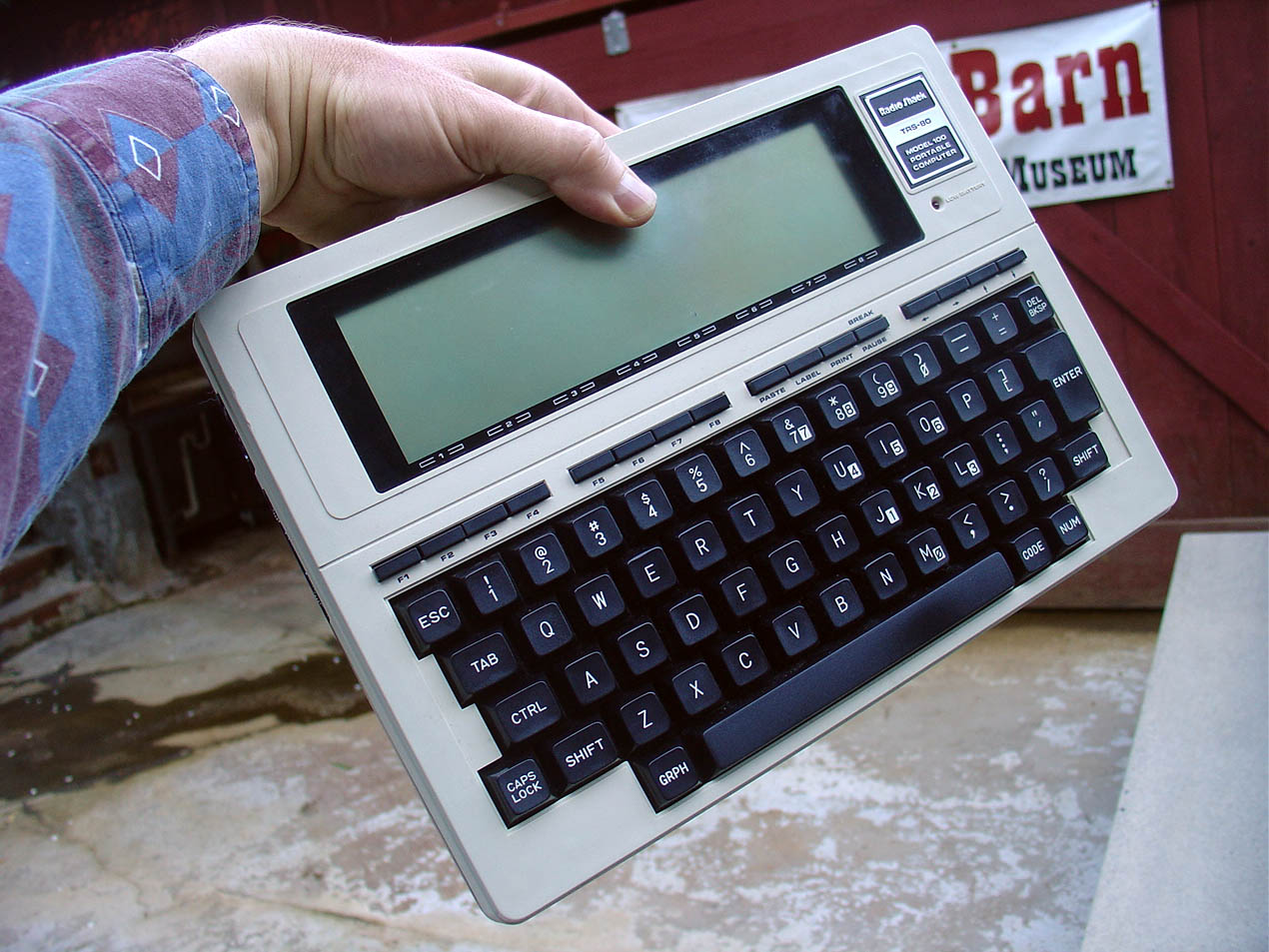
The Digibarn is a museum of old computers. They have a great virtual collection of every computer that I've ever owned and then some.

Here is just a small sample of weird computer systems I've owned or used extensively over the years:

Facebook currently has lots of curious personality matching tests such as "Which Disney Princess Are You?", Celebrity matching applications and personality comparison tests.

So here is a killer app idea for meeting old school geeks - why not combine the power of the Digibarn with the social network for Facebook to create a profile based on computers you owned over the past 20 years? Imagine having a date with someone who also owned a TI 99/4A, just like you? Imagine the nostalgic conversations about GOSUB, sprites and tape drives you could have over dinner?

At least it would be better than that Zombie Facebook application floating around these days...

Thursday, August 23, 2007

Take that First Step Toward Becoming a Legend (in IT Governance)!

I received this spam from Oracle the other day and I nearly fell off my chair laughing about how marketing people can really get things wrong if they try to apply consumeristic jingoisms to IT related products:


Do people in "IT Governance" (whatever that is supposed to mean these days) really need such a confidence boost that they need to be pandered to by suggestions that the systems, memos and processes they put in place will make them "legends" and their companies "Admired by your industry, as a leader in IT governance"?

And as an executive, imagine if the first impression of your company's brand was a "leader in IT governance" or that the "company's legacy" was really good IT governance?

I hope I never work for that company... :)

Tuesday, August 21, 2007

Best Logging Strategy using Microsoft Enterprise Library?

The Microsoft Enterprise Library has a really good Logging Application Block that allows you to make your logging infrastructure configurable. By simply typing in the following code:

Logger.Write("log this!");

you can log to a destination configured in your config file.

The Microsoft Enterprise Library out of the box provides the following destinations for logging messages:
  • Email
  • File
  • Database
  • Message Queue
  • Text File
  • WMI Event
  • Custom location

I took our web site and our main global error handler and did a dump routine of all exceptions to the log and it worked great. But the discussion in our team arose - where should we log? Here are some of our ideas as we debated the issue:

  • The least error prone seems to be the flat file. The custom location seems the worst option simply we would hope that our proprietary code is less tested in less real world scenarios than Microsoft's Enterprise Library components.
  • The idea of logging to the database is attractive from a reporting perspective, but everyone on the team felt like it was risky given that the most typical scenario for an error in the application itself was a database related error. I suppose if we had the logging database seperate from our application database then this would reduce the risk, but we don't have the resources for such a move, so if our application were to kill the database it would take down any logging sources there as well.
  • Even with the flat file, it is possible that it will fail. A simple scenario for it failing would that the file is read-only or the ASPNET process doesn't have permission to access the file. So we need at least two logging mechanisms to provide redundancy. The Enterprise Library allows for this - you can configure more than one listener for every log message being written.
  • Our second challenge with using flat files is that they no provide a notification mechanism like email. So if there is an exception, the file has to be constantly monitored or periodically checked. Therefore, combining an email message and a flat file backing store seemed like a decent combination. If the email fails, then we may not know for a day or two but at least the error will be logged. If the file fails, then at least we'll get the email.
  • The event log is not a bad option either and its generally easier to monitor as most monitoring tools already handle event log monitoring. The one issue with using the event log that I have found is that if you use an event log source that doesn't exist the logging will fail without any notification to you. Your error will simply disappear and won't be logged. You can use any existing EventLog source or create a new one in the registry for your custom logging needs. In addition, you have to make sure that the ASPNET account has permission to write to the event log.

That's where we are at so far - its not quite bullet-proof yet but its getting there. If you have any further suggestions or thoughts, leave them as a comment!

Arcade Game Prices are Finally Catching Up With Inflation

I've been playing arcade coin-op games since I was a little kid. When I started playing these games, they were 25 cents a throw. If you were good at them of course your quarter could go a long way. For example, there was a game called WonderBoy that I could play for about 45 minutes on one quarter.


Somehow despite 20 years of inflation, the price of an arcade game was stuck at 25 cents. Eventually, the prices went up by multiple credits being required, especially for newer games. The current arcade games seem to cost on average $1-2 per contest.

But if you went to the back of the arcade, you could still typically find an old Galaga, Gyruss or Pacman sitting in the back still running for a quarter a throw.

Well not so fast anymore - I was in one of the last arcades left in the city and these older games have now been replaced by emulators which allows the arcade owner to change the price and also house multiple video games in a single console. This makes sense - given the size in memory of any of these old video games, you could house hundreds of them on a single memory chip.

So I had fun today playing the old favourites, but I'm a bit disappointed that it cost me 50 cents. I guess after 20 years of dwindling attendance and increasing costs, the prices have finally gone up.

Thankfully, I have MAME which allows me to play any old video game for free!

Friday, August 17, 2007

Is Google Analytics Having Trouble Keeping Up?

Since I started this blog, I have been using Google Analytics to measure traffic to the site. In general, its a fabulous service and works really well, until recently.

I've noticed that in the past month or so, Google Analytics seems to have trouble keeping up with the traffic. I've noticed that the numbers reported are lower than expected and stay that way for 1-2 days and then as presumably the engine crawls through the right logs in queue, it catches up.

One way to tell for sure whether you're having a similar problem is compare your Google Analytics numbers to your Ad Sense numbers. Ad Sense seems to be more accurate and is updated in real time. Google Analytics is queue based and so tends to need some time to catch up. I've found in recent days that Ad Sense gives me a better indication of short term stats than Analytics.

For my blog, this is not a huge problem. But this is yet again a mark against the "software as a service" model - would you want to trust your corporate infrastructure to a queue in the cloud that can get bogged down because of an influx of unexpected growth?

Monday, August 13, 2007

Ad Words and Negative Content

The great site Worse Than Failure had a few images today of examples where legitimate ads were being shown side by side with negative content:


Having ad sense on my blog, I have noticed the same thing. I wrote a couple posts on the failure of Canada's tax software, and if you go to this post the ads displayed are for tax software!

Isn't this a pretty basic requirement for online advertising, e.g. don't put my ad for Levi's Jeans on a web page where the content is "I hate Levi's Jeans!"? Why after 10+ years of online advertising has the experts at Google and others figured out how to targets ads to the right content. In my example, the right ads would be those marketing to people reading about the failures of the tax system, e.g. tax lawyers, H&R block, etc. and not tax software providers.
