Monday, August 25, 2008

Good Example of How Tricky Security Is - Even for Banks

I signed up for online visa account access today at CIBC, and found a basic security flaw in their registration process.

Here is their form:


The flaw is the last question - the previous balance. The flaw is a simple one - if you call up VISA on the phone and give them the information above, the phone system provides your previous month's balance!

It just goes to show that even a security conscious bank can make easy mistakes when it comes to security and the moral of the story is a simple lesson: make sure you analyze all your access channels for possible leakage of authenticating information before you demand it online.

Live Earth vs. Google Earth - Which One Is Better?

I decided to run a comparison between Google Earth and Live Earth. Here are some of my findings.


Google Earth runs only as a separate executable. Live Earth runs as an ActiveX control within the live maps interface. Microsoft's approach is more integrated but it also means that you cannot run the application full-screen.

Google Earth seems to find locations better especially when they are vague. For example, I typed in "yonge and dundas toronto ontario" and Google Earth found the intersection. Live Earth couldnt find it and simply suggested businesses which weren't even at that location.

Google Earth's ability to handle misspelled words is much better as well. For example, I typed in "young street toronto ontario" and it was still able to find Yonge Street as an exact match. Microsoft Live Earth could not find it.

Microsoft Live Earth splits the search box between businesses and locations. The search assumes that you will split the business name and location into the two boxes. For example, I typed in "eaton centre toronto ontario" into the business box and it asked me for a location. In Google Earth, typing in the same search query finds me the exact match.

The search box in Google Earth is on the left hand side. In Microsoft Live Earth the search box is at the top of the screen. This makes a big difference if you are using a wide screen monitor. Microsoft's map ends up being very wide. Google Earth's map ends up being nice and square.

Microsoft's satellite pictures seem to be more up to date and detailed. Looking at downtown Toronto, the Google Earth satellite picture shows certain buildings under construction which I know are now complete while the Microsoft picture shows them finished. See also the picture of Monarch Park below and you'll notice a significant difference in picture quality and resolution.

Microsoft Live Earth


Google Earth

Both Microsoft Live Earth and Google Earth have 3D modeled buildings. However, Microsoft Live Earth's are vastly superior both in number and in quality. Google Earth shows about 5-10 buildings in Toronto where Microsoft shows hundreds.

Google Earth: Not Much of a City Scape

Live Earth: Now That's a Downtown!

Both applications take up a large amount of RAM to run. Looking at Task Manager, Google Earth was taking up to 800 megabytes of RAM and Internet Explorer was taking up to 600 megabytes. I assume this must be for caching of data.

For smaller towns, both applications seem to be equally poor. For example, searching for Port Hope, Ontario yields a poor grainy image in both cases likely because the high resolution satellite imagery is simply not available.

Google Earth

Google Earth is much richer in terms of content overlays and more flexible in being able to turn them on and off. My personal favourite is the Panaromio overlay which geo-maps personal photographs to locations from hundreds of thousands of users around the world.

Microsoft Live Earth has a feature called "Birds Eye" which does a map of photographs to the map taken from different angles. This feature is not available at all in Google Earth.

Microsoft Live Earth has very nice traffic reporting features. I was able to check the 401 highway in Toronto, see the busiest spots to avoid and also it provides construction updates as well. Google Earth does not have this feature at all.

Both applications provide directions. However, Google Earth has a feature that allows you to "play" the route. The camera will follow the route through the directions showing you in 3D how to drive to your destination.

Tuesday, May 20, 2008

Breaking the Law of Triple Constraints

In classical project management methodology, there is a concept called the Law of Triple Constraints:


The law states that as two of the constraints are changed, there must be an equal change on the third constraint while still maintaining the same level of quality.

For example, if scope is increased and schedule decreased, this MUST have an impact on the number of resources required. If resources are decreased, this MUST have an impact on either scope decreasing or schedule increasing.

However, in practice, this law is not really a law at all, or rather it is based on idealistic assumptions.

These assumptions are as follows:

1. The process for running the project has been 100% optimized.

2. The process for running the project is 100% known and not subject to any possible innovation to improve the picture.

3. Talent on the project is not changeable or all talent is the same.

4. The amount of management is precisely what is required to manage the project.


The reality is that in most projects these assumptions are simply not true. In addition, this model promotes a mechanistic, deterministic approach to managing projects that lacks an hope for innovation, efficiency or reduction in management.

Here are ways you as a stakeholder or project manager can "break" the Law of Triple Constraints without sacrificing quality:

1. Re-examine your estimates and make sure they are not overly padded. Some contingency is always required in order to handle unexpected events. However, on a $1 million project, the difference between 10% contingency and 30% contingency is $200K - is it really necessary?

2. Challenge the team to be innovative about process, documentation, testing, builds, etc. There are better ways to doing any project - no team is 100% optimized. I've seen simple changes such as using automated unit testing that makes massive differences in effort and actually improves quality. Depending on the type of project, there is innovation to be had.

3. Do you really need to build something or can it be bought?

4. Be ruthless about gold-plating on all sides. Developers, stakeholders, creative directors, etc. all like to add changes, rounds of revisions, additional documents, new features, etc. and that extra 10-20% makes a difference over the course of a large project.

5. Improve communication and lower documentation overhead. For every 300 page use case document you have to write, edit, review and then update make sure they are necessary artifacts and they have value. I was on a project once where the wire frame document cost $100K to produce!

6. Make sure you have the right talent for the job. For hard problems, you may think that having your junior flash developer be your technical architect will save you some money but in my experience the opposite is true - get the best talent you can possibly afford because they pay for themselves in much higher value than the additional cost in salary. For easy jobs, don't take your technical architect and make him your excel macro monkey - it will frustrate him/her and is a waste of their talent.

7. Get Creative! On every project, there are ways to innovate. It may be in the implementation of a particular module. It may be that you re-examine the problem you're solving and come up with something more elegant than when you originally built your plan.

8. Make your team entrepreneurial. Encourage open communication, risk taking, fast decision making, and low document overhead. Have the right level of process and no more than necessary. Give everyone ownership in the project and let them understand the big picture.

9. A simple tip: make sure your team members know deadlines! It sounds really dumb, but I have noticed a big difference in teams where they can see the entire plan and understand the context of deadlines than if a person is just handed a task piecemeal and told to complete it blind.

I've seen project plans that are bloated and I have seen some that are way too lean. Starting with bloat and cutting down I find is easier to manage than starting lean and trying to increase to handle the bare minimum requirements. Start with a robust, conservative and full process plan and then take a good look at it and see if there are some trimmings to be had.

One final note - this is not a panacea and in my experience, you can achieve a savings of somewhere between 0-20%. Don't expect that you can cut your project timeline in half. However, on a $1 million dollar project that's still $100-200K and on a 6 month timeline that's still a month of time saved.

As a project manager, you can choose what you do in terms of managing stakeholders' expectations. Typically, I use a conservative estimate to start and then I try to get innovative once I'm executing. If the risks of being creative and entrepreneurial pay off, then I look like a rock star with a project ahead of schedule, a happy team and satisfied customers.

But if you are a project manager who simply adheres to a conservative approach and obeys the Law of Triple Constraints like dogma, then you will be missing opportunities to innovate!

Wednesday, October 31, 2007

With $15B in Valuation Can Facebook Now Afford Some Quality Assurance?

I find it amusing that Facebook despite its high valuation and increased interest from Microsoft is still amateurish at times. One of the areas I find is in usability - there are some basic issues that any modern (or even 10 year old site) would handle better than facebook but haven't been addressed as the site grows and scales.

Here are a few examples!

Group Management

One of the areas that is really week in Facebook is group management. It seems that the whole assumption around being a group admin is that your group has about a dozen people.

For example, here is a simple but telling bug - try to remove a member in your group. About 2 months ago, this feature didn't seem to work at all. It now works, but there is no way to search for members! So in our case we have 1900+ members, and if we want to remove or block a member we have to scroll through 70 pages worth of names!

Sorting of Lists

Another example is the basic way that Facebook sorts lists. By default your friends list is sorted in alphabetical order by last name. If you do a search for Classmates, the sort order is the same - but this is not always what is needed. For example, I want to know recently updated Classmates because I've already scanned the list previously. There is no easy way to do this in Facebook.

Paging of Lists

Another basic usability issue - paging through lists doesn't actually page properly! If you click next, you'll see people who were on the previous page.

Inviting People to Groups

In groups, you can invite your friends to join. In previous "versions" of Facebook, it would only show friends in the invite list who you hadn't previously invited. Now it seems to show all your friends but if you click on the friend who has been previously been invited, it pops up a warning and doesn't allow the action. How is an improvement?

All of these are basic usability issues related to scale - what works for a friends list of 20-30 people doesn't scale as an interface if you have 2000 friends, group members, etc. But as Facebook tries to be a "platform" it needs to be able to address these concerns - these are pretty basic and most applications whether Web 2.0 or traditional client server have basic functions for sorting, searching and filtering lists!

Tuesday, October 16, 2007

Are AJAX enabled forms really worth the trouble?

We have just launched our new Tribute Application for creating customized cards for donations in honour or memory of someone you love.

We used Microsoft .NET and the new AJAX library for development of our forms. Our developer teams became enthusiastic supporters of using AJAX styled controls for creating a sense of immediacy in the interface.

However, what was interesting was the new set of bugs that cropped up simply because of now using AJAX controls. Here is an example: the above form has two controls for postal code and zip code and based on which state or province is picked, we flip between them so that you can have client side validation, proper field lengths, etc. Sounds simple enough, but we went through quite a bit of work and bug fixing to make this work.

Here are a few bugs that we found in the process as examples:

1. When you click the back button the right control isn't always displayed.
2. We had styling/layout issues in Mozilla.
3. When you picked a state and then switched to province the value would disappear.
4. The switching of state was generally quite slow on some clients.

In the "old days", the interface would have been really simple - a text box submitted to a server side script. Very few presentation layer bugs because there wasn't really anything going on in the presentation.

So the question becomes - is it really worth it? For Yahoo Mail it might be, but for an average data entry form is it really that crucial?

Now that we're planning phase 2 on our project, I would be much more cautious about going gung-ho on AJAX simply because it dramatically increases the testing/bug fixing time for what amounts to a simple user interface convenience.

Friday, September 21, 2007

Software Development Metaphors

There are lots of discussions on Software Development "methodologies". They are codified sets of practices on how to do software development "correctly". When you get down to the root of each of these methodologies, the root of all of them is a metaphor. Before you adopt a methodology such as XP, Scrum, RUP, Software Factory, etc. you should really ask yourself what metaphor you believe your particular software development practices fit into and what metaphors fit your particular organization's culture. If you start there instead of at the "here is my fancy new toolbox of processes" then adoption will be higher.

So here is a list of popular metaphors used to explain the practice of creating software...

The Traditional Software Development Metaphors

Software Development as Factory
  • Heavy emphasis on frameworks (assembly line) and components (widgets)
  • Use in large scale development projects (hundreds of developers) or highly distributed projects (outsourced)
  • Highly centralized control of processes, tools, etc.

Software Development as Engineering

  • Heavy focus on estimation techniques
  • Fixes made in planning are less expensive than after “construction” has started.
  • Highest project management priority is being “in control”.
  • Software development as a science, e.g. objective, measurable.
  • Belief that Software Development is an immature or imprecise version of engineering.

Software Development as Model/Architecture

  • Architect as “GOD”
  • Code is simply implementation of a model
  • If the software doesn’t work, either the model is wrong or the code doesn’t implement the model properly.
  • Tooling can automatically generate application from the model.
  • Software models a business, a process, etc. in design. Goal of software is to accurately reflect real life processes.
  • Need specialized modeling languages, expertise, and tools

Software Development as Workflow/Process

  • Projects as repeatable processes.
  • Workflow is defined up front, and people are compartmentalized.
  • Emphasis on distribution, encapsulation and hand-off.
  • Project managers are process champions – they make sure the rules are followed.

These metaphors have formed the bedrock of software development. They represent the traditional way of viewing software development as well as project management in general. They have enabled a whole toolbox of techniques, tools and templates for managing projects and software development.

The Radical Software Development Metaphors

These metaphors have become in vogue thanks to various agile methodologies, reactions against the traditional view of software and frankly a lot of failures for the traditional metaphors to come to grips with the complexities of creating software.

Software Development as Craft/Voodoo/Martial Art

  • Focus on simplicity, elegance, and craftsmanship
  • Toolbox approach
  • Apprentice / Master / Guru model
  • Software is highly dependent on people
  • Software “Design” provides guide to picking solutions

Software Development as Game Playing

  • Games are processes without the prescription
  • Games can be open or closed, cooperative or competitive
  • Rules of the game are enforced, but outcome is unknown
  • Games also include collaborative activities such as sports, playing music, dance, etc.

Software Development as Book Writing/Composition/Poetry

  • Iteration, drafts, reviews, etc.
  • Focus on creativity within an established structure.
  • Objective is known, but product is not well defined.
  • Challenges in forcing creative process into rigid scope, time lines and budget are recognized.

Software Development as Learning/Experiment/Invention

  • Modeling in software is about learning
  • Documentation, requirements gathering is a means to collective learning
  • Focus on establishment of common language
  • Prototyping, experiment, measuring as a way to learn

Which one fits your culture, your organization needs, and your skill set? If you're a start-up company, then the software factory metaphor might not be the best fit. However, if you're building printer drivers with third party outsourcers in India, then perhaps it is the right model.

If you start with basic metaphors, the toolbox and methodologies such as RUP, XP, Scrum, Waterfall, etc. start to make more sense - they're expressions of the underlying metaphor. In addition, if you want to evangelize a new software development methodology (for example, those who are trying to evangelize the use of XP in a traditional RUP organization) starting with a discussion around metaphors and basic understanding of software development might help the discussion, especially with non-technical users.

One last suggestion - this discussion is a great interview topic for Project Managers. If you want to hire an "Agile" PM, then start the interview with the list of metaphors and ask them which one they believe fits their style of working. If they pick one metaphor, then get them to explain how their PM toolbox (GANTT charts, risk matrices, status reports, etc.) fit into the metaphor. The traditional toolbox can be used in an agile context if the underlying metaphor is right - there are ways to use MS Project even if you believe that Software Development is more like writing a book then building a bridge.

Monday, August 27, 2007

The DigiBarn and Facebook - A Killer Way to Meet Old School Geeks?

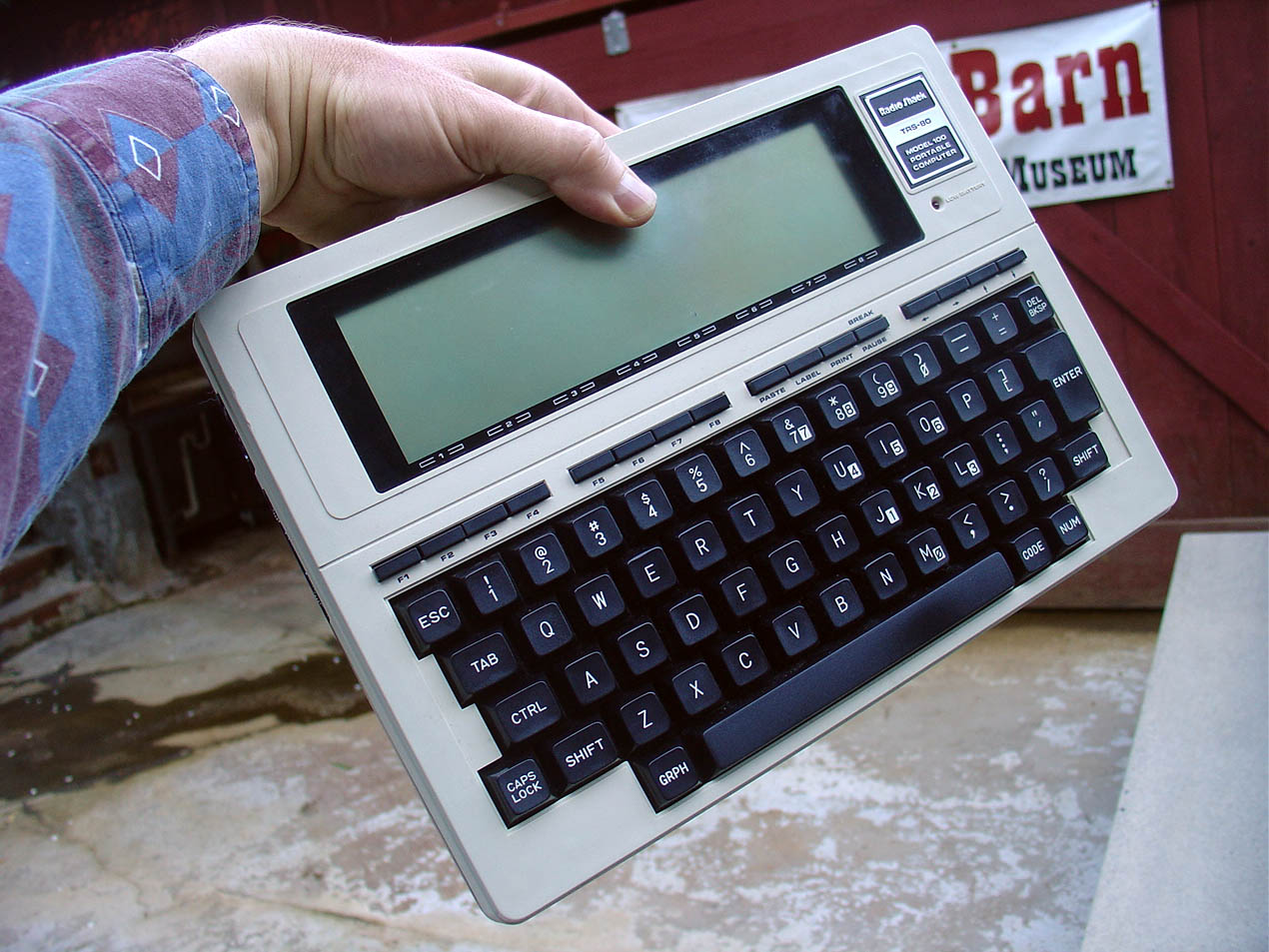
The Digibarn is a museum of old computers. They have a great virtual collection of every computer that I've ever owned and then some.

Here is just a small sample of weird computer systems I've owned or used extensively over the years:

Facebook currently has lots of curious personality matching tests such as "Which Disney Princess Are You?", Celebrity matching applications and personality comparison tests.

So here is a killer app idea for meeting old school geeks - why not combine the power of the Digibarn with the social network for Facebook to create a profile based on computers you owned over the past 20 years? Imagine having a date with someone who also owned a TI 99/4A, just like you? Imagine the nostalgic conversations about GOSUB, sprites and tape drives you could have over dinner?

At least it would be better than that Zombie Facebook application floating around these days...